

Sive.Host ChatGPT plugin (MCP)
The customer-facing MCP server is available at https://sh.sive.ai/mcp and publishes all 62 SHAPI actions as focused ChatGPT tools.
Connect
- Generate an API key and secret at Sive.Host SHAPI.
- In ChatGPT, enable Developer mode under Settings > Security and login.
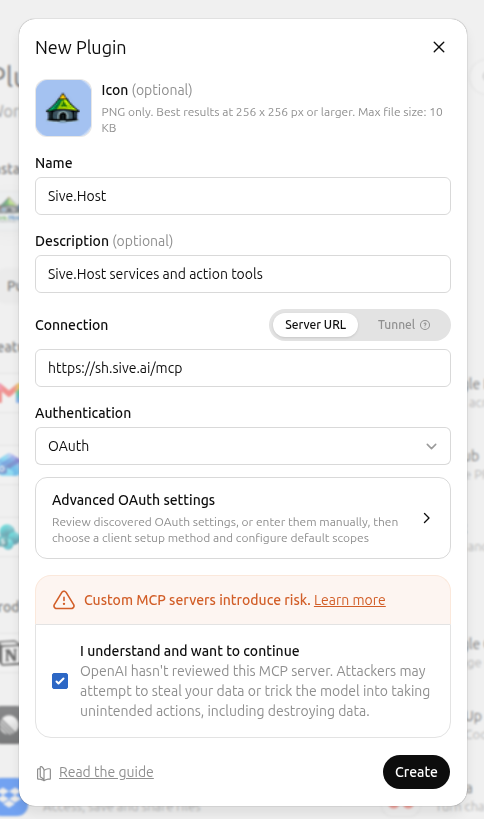
- Open Plugins and add a connection named Sive.Host using
https://sh.sive.ai/mcp. - Put connection as https://sh.sive.ai/mcp and leave OAuth as is and go directly to check or agree to "I understand and want to continue", then click "Create"
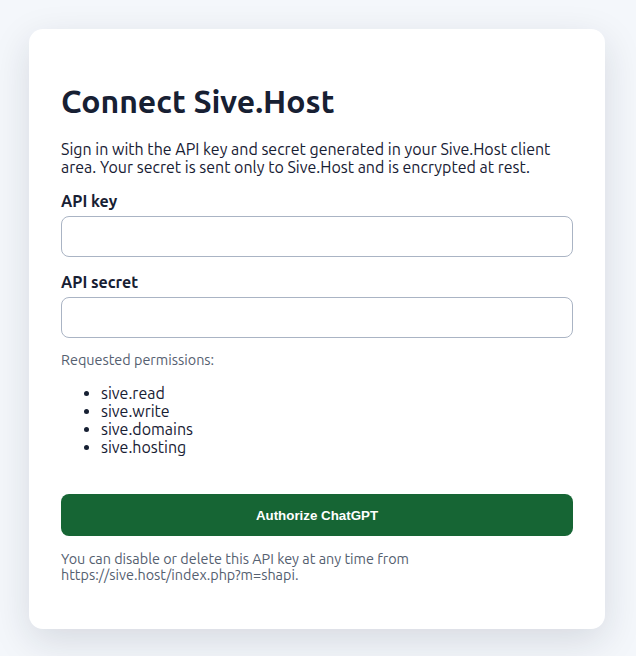
- Click on the next screen "Sign in" then Authorize with the customer API key and secret.
Scopes
sive.readsive.writesive.domainssive.hosting
Purchases, deletion, credential changes, and generic DirectAdmin writes are marked consequential. Ownership and permissions are still enforced by SHAPI.
DirectAdmin safety boundary
User and reseller API routes are available for owned DirectAdmin services. Server administration, CustomBuild, terminal, arbitrary command execution, system packages/services, and restart routes are not exposed.
SHAPI documentation version 2.0.
